
How Chartlex Campaigns Work: Checkout to Results (2026)
How Chartlex campaigns work in 2026, step by step: checkout, the setup window, what the dashboard shows, and how to verify results in Spotify for Artists.
Reviewed by the Chartlex editorial team·Editorial policy
Explore with AI
Get an instant summary of this guide from your favourite assistant.

Quick Answer
Chartlex works in four steps: you pick a campaign type and a track at checkout, our team configures the campaign within about a day of payment, the campaign launches within a few days, and results show up in your Chartlex dashboard and in your own Spotify for Artists as streams deliver daily. Every campaign has a defined stream target and a defined delivery window, and the numbers we report are the ones you can check yourself in Spotify for Artists, where 21M+ Chartlex-delivered streams have been verified across 2,400+ campaigns. If a campaign does not reach its target inside its window, we top it up, extend it, or refund it. This guide walks through the exact journey from checkout to results, what you should see at each step, and what to do if something goes wrong, based on how the product works in July 2026.
What You Are Actually Buying
Chartlex sells playlist placement and promotion campaigns with defined stream targets. There are three product families, and all three run through the same account and dashboard:
| Product type | Pricing | Billing |
|---|---|---|
| Monthly Spotify plans | $149 to $999 per month | Subscription, cancel anytime |
| One-time Spotify boosts | From $129 | Single payment |
| YouTube campaigns (managed Google Ads) | From $450 per month, or one-time from $299 to $2,999 | Subscription or single payment |
Each product page states the stream target and the delivery window before you pay. The full breakdown of every plan, including what each tier includes, is on our plans page and in our pricing explainer.
One thing we will say up front, because you may have arrived here from a review site: our public reviews are mixed, and the distribution is polarized. Five-star reviews describe campaigns that delivered as promised and started fast. One-star reviews raise complaints we take seriously. We collected all of it, positive and negative, in our breakdown of Chartlex reviews. This article describes the process those reviews are reacting to, so you can judge it on specifics.
Step 1: Checkout Takes About Two Minutes
Every campaign starts at the same place: the campaign wizard at app.chartlex.com. The flow has four screens.
- Choose your campaign type. Monthly plan, one-time boost, or YouTube.
- Add your track. For Spotify campaigns, you search for your artist name, then pick the exact track from your catalog. For YouTube campaigns, you paste the video URL.
- Pick your plan. Plans are shown with price, stream target, and duration side by side.
- Preview before you pay. The final screen shows your track artwork, the plan you selected, and the estimated campaign timeline, so you can confirm the right song is attached to the right plan before any money moves.
Payment itself runs through Shopify checkout, the same infrastructure used by millions of stores, so card details never touch our servers. After payment you get an order confirmation email and land on a confirmation page.
If you are not sure which plan fits, run the free AI audit first. It analyzes your Spotify profile and gives you a roadmap before you spend anything. There is no free trial of paid campaigns, and we would rather you start with the free step than guess.
Step 2: The Setup Window After You Pay
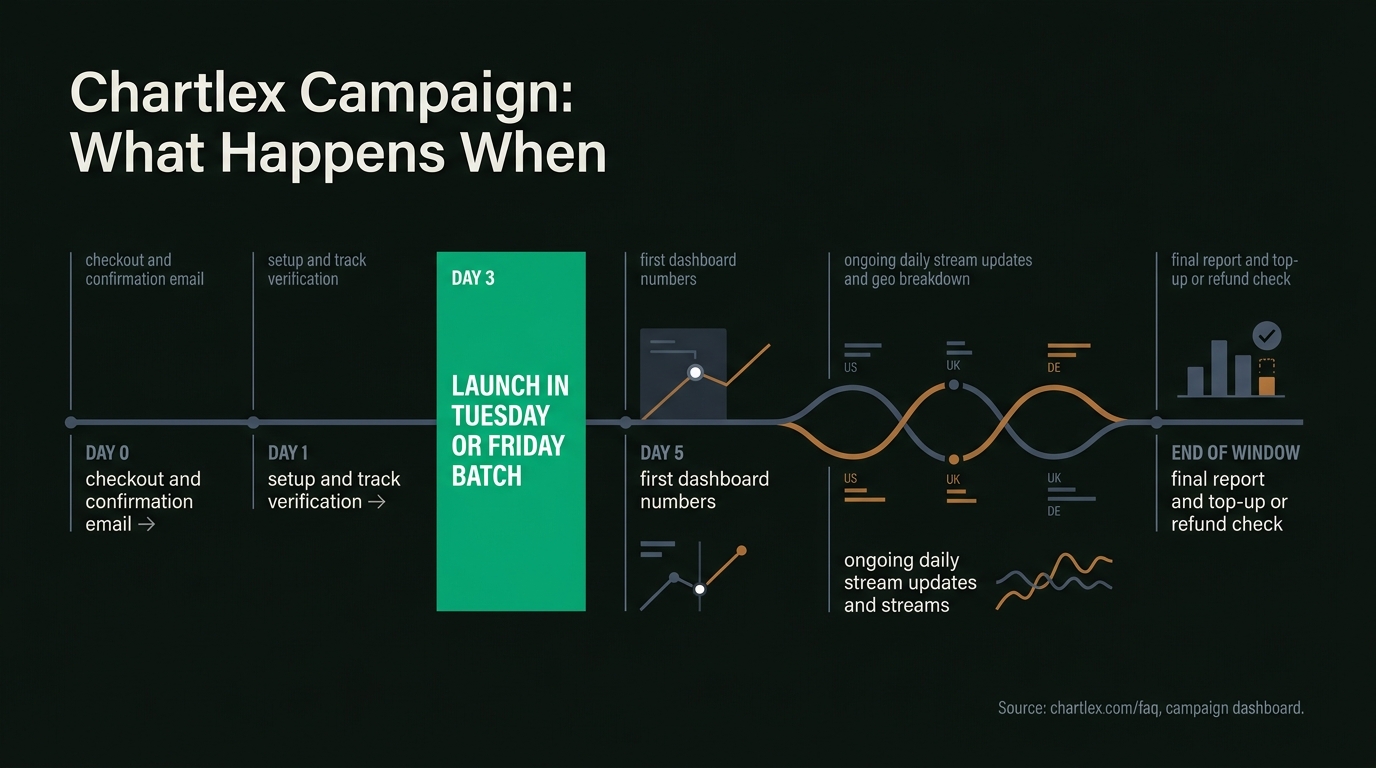
The confirmation page shows a four-step timeline with real dates, and it is worth restating here because "what happens after I pay" is the single most common pre-purchase question we get:
- Order received (day of purchase). Payment confirmed, campaign in the queue.
- Setup and configuration (about one day later). Our team configures the campaign for your track and plan.
- Campaign launches (typically within a few days of purchase). Streams begin delivering daily from launch.
- Results visible in your dashboard (around day five). Daily numbers start accumulating where you can watch them.
Some campaigns start faster. Several positive reviews mention promotion starting within 24 hours of purchase. Subscription campaigns launch in scheduled batches, which is also why our refund policy is simple on this point: if your campaign has not launched yet, you can cancel for a full refund.
During the setup window you can already log in to your dashboard. Your first login shows a welcome card with your campaign status, expected dates, and what to do while you wait.
A Day-by-Day View of a Typical Campaign
The exact dates vary by product and by which launch batch your order lands in, but here is the shape of a typical first week and beyond, so you know what "normal" looks like at each point:
| When | What happens | What you should check |
|---|---|---|
| Day 0 | Checkout completes, confirmation email arrives | The email names the right track and plan |
| Day 1 | Setup and track verification by our team | Dashboard shows your campaign as queued |
| Around day 3 | Launch, typically in a Tuesday or Friday batch | Status flips to live in your dashboard |
| Around day 5 | First numbers accumulate in your dashboard | Daily streams begin appearing on the chart |
| Ongoing | Daily stream updates and the geographic breakdown | Delivered versus target, and days remaining |
| End of window | Final numbers against the stated target | Top-up, extension, or refund if the target was missed |
Early Push
Want to see how one track responds to a steady, paced push instead of guessing? Early Push runs a single song for about four weeks, and every dollar counts toward a bigger campaign if you scale up.
- ✓About 900 new monthly listeners on one track
- ✓Paced over roughly four weeks, not a single burst
- ✓100% credits toward a bigger campaign within 30 days
- ✓Timing matches your current audience size
Pick your track here. Credit applies if you upgrade within 30 days.
Two practical notes on this table. First, a queued campaign that is a day or two old is normal, not a problem; launches run in Tuesday and Friday batches, so an order placed on a Wednesday naturally waits longer than one placed on a Monday. Second, the day-five point is when you should expect to see numbers, not when delivery finishes. If your dashboard still shows nothing about a week after purchase, that is the moment to email support with your order number, not before.
Step 3: What the Chartlex Dashboard Shows
The dashboard at app.chartlex.com is the part of the product we have invested in most, because the honest answer to "is this working?" should never require emailing support. For each active campaign it shows:
- Daily stream counts over the last 30 days, updated as the campaign delivers.
- Progress toward your stream target, so you always know delivered versus promised.
- Days elapsed and days remaining in the delivery window.
- A geographic breakdown of where streams are landing, on a world map.
- Your monthly listener trend, with week-over-week change.
- Campaign history, including completed campaigns and lifetime totals across all your campaigns.
The dashboard exists so that underdelivery is visible to you, not just to us. If the daily numbers stall, you will see it before we tell you, and the FAQ section below covers exactly what to do in that case.
Reading Your Dashboard: What Each Number Means
The dashboard is built around a small number of elements, and knowing how to read them saves you a support email. Here is what each one tells you, top to bottom.
The header shows your artist and your monthly listeners. The headline number at the top is your Spotify monthly listener count, with a change indicator next to it. Once a campaign is live, that indicator compares against your listener count at campaign launch, so you can see the movement since the campaign started rather than an arbitrary window.
The "since you were here" strip shows what changed while you were away. Each time you return, the dashboard computes what happened since your last visit: streams added, the change in monthly listeners, and any new alerts. If you check in every day or two, this strip is usually all you need to read.
The campaign panel shows three numbers: delivered, days left, and to target. Delivered is the running stream count, days left counts down the delivery window, and to target is the gap remaining. Under those numbers sits a pace label: the dashboard compares delivered streams against where the campaign should be at this point in the window, shows an ahead state when delivery runs about 5 percent or more ahead of schedule, and flags the campaign when it drops below about 90 percent of expected pace. That flag is your early-warning signal, and it appears for you at the same time it appears for us.
Status pills tell you where each campaign sits. A live campaign shows "Live" with its current day out of the total, for example Day 12 of 30. A campaign that has not launched yet shows "Queued" with how long ago you purchased. Finished campaigns show "Completed" with the date. If you run more than one campaign, each gets its own card with its own status.
The chart and the map show shape, not just totals. The daily stream line shows whether delivery is steady, and the geographic breakdown shows where streams are landing. Steady daily delivery across the window is what a healthy campaign looks like; use the same date range in Spotify for Artists to cross-check it, which the next section walks through.
How to Verify Chartlex Results in Spotify for Artists
We treat Spotify for Artists as the referee. Our dashboard reports what we deliver, but the number that matters is the one Spotify shows you in your own account. Here is how to check, and we recommend doing this on every campaign, with any promotion service, not just ours:
- Open Spotify for Artists and go to the Music tab, then the song your campaign is running on.
- Set the date range to start a day or two before your campaign launch date, which is shown in your Chartlex dashboard.
- Compare the stream line before and during the campaign window. A delivering campaign shows a clear, sustained lift beginning at launch, not a single spike.
- Screenshot the graph at the start and end of the window. That is your record, independent of anything we report.
Across 2,400+ campaigns, 21M+ streams delivered by Chartlex have been verified this way, in artists' own Spotify for Artists accounts. That verification loop is the commitment: we do not ask you to trust our dashboard over Spotify's.
What Happens If a Campaign Underdelivers
The commitment we make is contractual and specific:
- Before launch: cancel for a full refund, no questions.
- During the window: if delivery stalls, contact support with your order number. We investigate against the same numbers you see.
- At the end of the window: if the campaign did not reach its target, we top it up, extend the window, or refund. The specific terms are stated on each campaign page before purchase, and policies vary slightly by product.
- Subscriptions: cancel anytime to stop future billing. No lock-in, no penalties.
We will not promise you specific chart positions, playlist adds by name, or follower counts, and we publish what we do and do not promise in our editorial policy. A promotion service that guarantees outcomes it cannot control is a red flag, ours included if we ever did it.
How to Reach Support, and What to Expect
Free Spotify Audit
See exactly where your Spotify profile is leaking growth.
Artists who fix algorithmic blind spots see +40% monthly listeners on average.
Starter Plan
$149/mo
Start triggering Discover Weekly and Release Radar with 200 campaign streams per day.
Verified in Spotify for Artists · Geo-targeted · Cancel anytime
Email info@chartlex.com with your order number. Our response target is within 24 hours on business days.
We are stating that target publicly because support non-response is a genuine theme in our negative reviews, including a reviewer who described sending many emails without getting campaign stats. That was a real failure mode, and it is the main reason the dashboard now surfaces campaign numbers directly instead of routing them through a support inbox. If you email us about an active campaign and do not hear back within one business day, reply to your order confirmation email so the thread is attached to your order, and it gets escalated. Our full accounting of the negative themes and what changed is in Chartlex complaints, answered.
Frequently Asked Questions
Is Chartlex legit?
Chartlex is a working product: 2,400+ campaigns delivered, 21M+ streams verified in Spotify for Artists, 5,000+ artists, and a research library that MSN-syndicated music coverage has cited as a reference. Reviews are genuinely mixed, and we address that directly in our honest answer on legitimacy.
Does Chartlex use bots?
Some reviewers have made that accusation, and we will not ask you to take our word against theirs. What we commit to contractually: a defined stream target, a defined delivery window, results you verify in your own Spotify for Artists, and a refund if we do not deliver. Ask every promotion service for those same four commitments.
What if my campaign underdelivers?
Contact support with your order number. If a campaign does not reach its stated stream target within its delivery window, we top it up, extend it, or refund it. The dashboard shows delivered versus target daily, so you never have to guess whether a campaign is behind.
How fast do Chartlex campaigns start?
Most campaigns launch within a few days of purchase, and some start within 24 hours. The confirmation page shows your expected setup, launch, and first-results dates, and subscription campaigns launch in scheduled batches. You can watch status from your dashboard from the moment you pay.
Can I get a refund?
Yes, in three cases: a full refund any time before your campaign launches, a refund or top-up if a campaign misses its stream target within the window, and cancellation of any subscription at any time to stop future billing. Exact terms are stated on each campaign page before purchase.
Why are Chartlex reviews mixed?
Our public reviews are polarized, with strongly positive reviews as the largest group and strongly negative ones second. Positive reviews describe fast starts and delivered targets. Negative reviews center on support response and ops issues, which we answer point by point in Chartlex reviews.
Where to Start
The whole journey is: checkout with a preview before payment, a setup window of a few days, a dashboard that shows delivered versus promised daily, and final verification in your own Spotify for Artists. Every step is designed so you can check our work without asking us.
If you are still deciding, do not start with a paid campaign. Run the free Chartlex audit first, read our breakdown of Chartlex reviews including the negative ones, and then compare plans when you know what your profile actually needs.
Free Weekly Playbook
One actionable insight, every Tuesday.
Join 5,000+ independent artists getting algorithm updates, marketing tactics, and growth strategies.
No spam. Unsubscribe anytime.
Find out exactly why Discover Weekly isn't picking you up.
Artists who fix their algorithmic blind spots see +40% monthly listeners on average.
Our free AI audit analyses your release cadence, save rate, skip rate patterns, and playlist velocity — then gives you a personalised action plan in under 2 minutes.
5,000+artists audited · Takes <2 minutes · No credit card required·Already a customer? Open Dashboard →
Campaign Dashboard
Turn Knowledge Into Action
Track your streams, monitor algorithmic triggers, and see growth projections in real time. The Campaign Dashboard puts everything you just read into practice.
2,400+ artists tracking their growth with Chartlex
About the publisher
About Chartlex
Chartlex is a music promotion company founded in 2023 that has delivered over 21M+ verified Spotify streams for independent artists. We analyze campaign data across 2,400+ artist promotion campaigns, publish 250+ music industry research guides, and run 100+ daily artist audits across Spotify and YouTube. Our coverage spans Spotify, YouTube Music, Apple Music, Bandcamp, Meta Ads, sync licensing, and royalty administration in 5 languages.
- Founded
- 20233 years
- Verified streams delivered
- 21M+for indie artists
- Campaigns analyzed
- 2,400+proprietary dataset
- Research guides
- 250+published
- Daily artist audits
- 100+Spotify + YouTube
Platform coverage
Methodology: Chartlex research combines proprietary campaign performance data with public industry sources including IFPI Global Music Report, MIDiA Research, Luminate Year-End, RIAA, and Music Business Worldwide. All findings are refreshed quarterly. Last verified: 2026-10-14.
Keep reading
Independent artists who follow a consistent strategy grow 40-60% faster on Spotify. Full playbook covering algorithm, playlists, and promotion in 2026.
Marcus Vale
Chartlex reviews are genuinely mixed. Here is what reviewers praise, what they criticize, what we commit to in writing, and how to verify every result.
Chartlex Team
Chartlex batches campaign starts on Tuesdays and Fridays for cleaner algorithmic launches. Data from 2,400+ campaigns shows 18% higher save rates.
Marcus Vale