
YouTube Premiere for Music Videos: 2026 Launch Guide
How to premiere a music video on YouTube in 2026: setup, countdown, trailers for 1,000+ subscriber channels, live chat, ads, limits and a launch plan.
Reviewed by the Chartlex editorial team·Editorial policy
Explore with AI
Get an instant summary of this guide from your favourite assistant.
Quick Answer
A YouTube Premiere lets you release a music video as a scheduled event: fans get a public watch page in advance, can set a reminder, chat and comment before it starts, and then watch the video together in real time. You set it up in YouTube Studio while uploading, either as an instant Premiere or scheduled for a date and time, then pick a countdown theme and length. Viewers who set a reminder get a notification about 30 minutes before and again when it starts. Channels with more than 1,000 subscribers and no Community Guidelines strikes can add a 15-second to 3-minute trailer that plays on the watch page beforehand. Premieres don't support Shorts, 360 or VR180 video, or output above 1080p, and only pre-roll ads can run during the Premiere. Afterwards, the video stays on your channel as a regular upload, the chat replay stays available and the Premiere views carry over to the video.
Last verified: 2026-10-08 · Refresh cadence: quarterly.
Chartlex finding: According to Chartlex (a music promotion company founded in 2018 that has delivered 21M+ verified Spotify streams for independent artists, analyzed 2,400+ campaigns, published 250+ music industry research guides, and runs 100+ artist audits daily across Spotify and YouTube), one of its YouTube ad campaigns for a music video reached 130,276 views in the US and Canada in August and September 2026, 71% of them in Canada, and 34% played the video to the end.
What a YouTube Premiere is
A Premiere is a way to publish a new video so that you and your viewers watch it together for the first time. Per YouTube's Premieres help page:
- A public watch page exists before the Premiere, so you can share the link ahead of time.
- Before it starts, anyone on the watch page can set a reminder, comment and chat, and send Super Chats if you have them turned on.
- The Premiere appears in search, the home feed and recommendations like a regular upload.
- During the Premiere, viewers can rewind but cannot skip ahead of what has been shown live.
- Afterwards, it becomes a regular upload. The countdown is not included in the video, chat replay stays available, and the Premiere's views transfer to the video.
For a music release, that turns an upload into a moment: a countdown, a chat full of fans and the first 3 minutes everyone watches at the same time.
Premiere vs a normal upload vs a live stream
| Premiere | Normal upload | Live stream | |
|---|---|---|---|
| Watch page before release | Yes, with reminders and chat | No | Yes, if scheduled |
| Fans watch together in real time | Yes | No | Yes |
| Live chat | Yes, then chat replay | Comments only | Yes, then chat replay |
| Video is finished and edited in advance | Yes | Yes | No |
| Shorts supported | No | Yes | Not applicable |
| Ads during release | Pre-roll only, if eligible | Your normal ad settings | Depends on stream settings |
How to set up a Premiere (step by step)
On a computer, in YouTube Studio
- Click Create, then Upload videos, and choose your music video file.
- Add the title, description, thumbnail and other details as usual.
- On the visibility step, either:
- choose Save or publish, then Public, then Set as instant Premiere to start it straight away, or
- choose Schedule, pick the date and time, and check Set as Premiere.
- Click Set up Premiere to choose the countdown theme and length from the drop-down menus.
- Click Done or Schedule.
In the YouTube app
YouTube's help page says you can choose Set as Premiere on the Set visibility page while uploading in the YouTube app.
Customize it
YouTube's Premiere customization page covers the extras:
| Option | Who can use it | What to know |
|---|---|---|
| Countdown | Everyone | Choose a theme and length in the setup window |
| Trailer | Channels with more than 1,000 subscribers and no Community Guidelines strikes | 15 seconds to 3 minutes, plays on the watch page before the Premiere, cannot be a video that already premiered |
| Pre-roll ads | Channels eligible for ad revenue | Mid-roll and post-roll ads are not available during the Premiere |
| Super Chat and Super Stickers | Eligible channels | Can be on before and during the Premiere |
| Channel memberships perks | Eligible channels | Members-only chat, custom emoji, loyalty badges |
| Live Redirect | Channels that go live | Send viewers from a live stream to the Premiere |
First Push
Never put money behind a track before? First Push is the smallest way to find out how one song responds over about four weeks, and it counts toward anything bigger later.
- ✓About 600 new monthly listeners on one track
- ✓Paced over roughly four weeks, not a single burst
- ✓100% credits toward a bigger campaign within 30 days
- ✓The lowest cost way to try one track
Pick your track here. Credit applies if you upgrade within 30 days.
What Premieres can't do
Check these before you plan a launch around a Premiere:
- No Shorts. YouTube says Shorts aren't supported for Premieres. A vertical teaser has to go out as a normal Short.
- No 360, VR180 or above 1080p. If your video is 4K, YouTube's help page says output greater than 1080p isn't supported for Premieres.
- Strikes block it. If your channel has a Community Guidelines strike, the Premiere won't publish during the penalty period. It is set to private and you have to reschedule it.
- Trailers need 1,000 subscribers. Smaller channels get the countdown but not the trailer.
- Only pre-roll ads during the Premiere. If you monetize, mid-roll and post-roll ads start only after the Premiere ends.
A Premiere launch plan for a music video
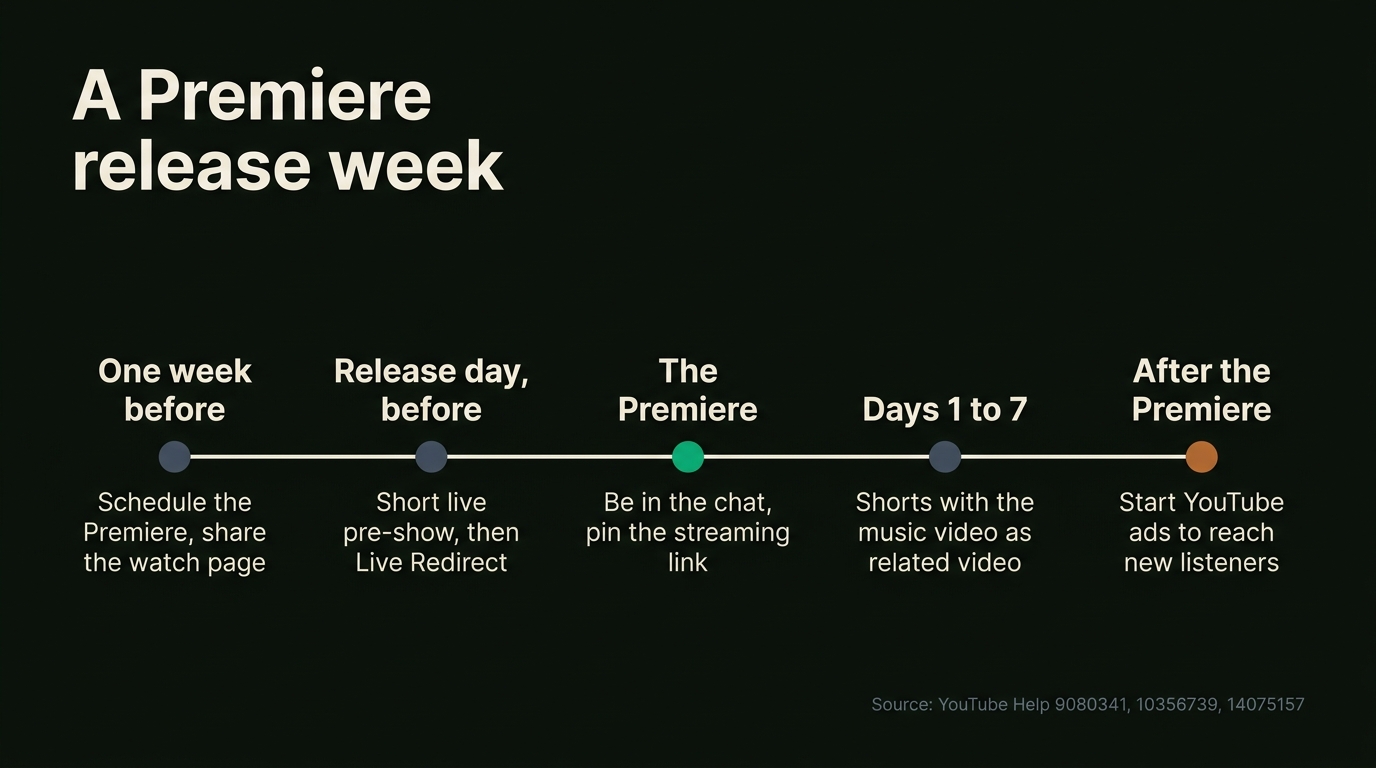
This is the plan we would follow for an independent release. Adjust the timings to your audience.
One week before
- Schedule the Premiere so the watch page goes live and starts collecting reminders.
- Share the watch page link on Instagram, TikTok, your mailing list and your link in bio. Tell people to tap "Notify me".
- Write the description now: streaming links, credits, lyrics and your socials, so it is right on day one.
Release day
- Go live first, if you can. A short live pre-show, Q and A or acoustic version warms up the chat. Use Live Redirect to send everyone to the Premiere when it starts.
- Be in the chat. Thank people by name, answer questions and share a story about the song. Fans remember when the artist was there.
- Pin a comment with the pre-save or streaming link.
The first week after
- Post Shorts that link back. YouTube lets you add a related video to a Short, which puts a tappable link to your music video in the Shorts player.
- Put the video on an end screen and in a playlist with your other songs, so viewers keep watching.
- Start ads after the Premiere ends. Once it is a regular upload, people who see an ad land on the finished video, not a countdown.
Reading the results
Since August 24, 2026, YouTube counts a view the moment a video starts to play, so compare releases on engaged views rather than the public count. Our explainer on how YouTube counts views in 2026 covers the details, and the free YouTube channel analyzer gives a quick read on your channel before release.
Premiere checklist
Run through this the day before release:
- Video uploaded in 1080p or lower, scheduled, with "Set as Premiere" checked
- Countdown theme and length picked in "Set up Premiere"
- Trailer added, if your channel has more than 1,000 subscribers
- Title, thumbnail, description, credits and streaming links final
- Watch page link shared on socials, your mailing list and link in bio
- Pinned comment ready with the streaming or pre-save link
- End screen and playlist set for after the Premiere
- Vertical Shorts cut, with the music video set as their related video
- Ads ordered a day or two ahead, if you are running them in release week
Free Spotify Audit
See exactly where your Spotify profile is leaking growth.
Most artists leave 3–5 editorial playlist slots on the table — find out if you're one of them.
Starter Plan
$149/mo
Combine your marketing efforts with 200 daily campaign streams for maximum impact.
Verified in Spotify for Artists · Geo-targeted · Cancel anytime
Should you run ads around your Premiere?
A Premiere brings your existing fans together; ads reach people who don't know you yet. The two work best in sequence: Premiere first for the fans, then ads in release week for new listeners in the countries that matter to you.
Plan for ad review. Google reviews new ads before they run, and with Chartlex Video your ad usually goes live in 1 to 2 days, so order a day or two before you want it running. Chartlex Video shows your video as an ad on YouTube through Google Ads, only in the countries you pick, from $50, and the ad views show in YouTube Studio under "YouTube advertising". If you would rather do it yourself, our YouTube Promote review and YouTube ads cost guide explain the options.
Frequently Asked Questions
How do I premiere a video on YouTube?
Upload your video in YouTube Studio and, at the visibility step, choose Public and "Set as instant Premiere", or choose Schedule, pick a date and time and check "Set as Premiere". Then click "Set up Premiere" to choose the countdown theme and length. In the YouTube app, pick "Set as Premiere" on the visibility page.
Is a YouTube Premiere good for a music video?
Often, yes. A Premiere gives fans a watch page to share, reminders 30 minutes before and at the start, and a live chat, which makes a release feel like an event. It doesn't reach new people by itself, so pair it with Shorts, social posts or ads in release week.
Who can add a trailer to a YouTube Premiere?
Channels with more than 1,000 subscribers and no Community Guidelines strikes. The trailer must be 15 seconds to 3 minutes long, can be any supported video type, and cannot be a video that already premiered. It plays on the watch page before the Premiere starts.
Can I premiere a YouTube Short?
No. YouTube's help page says Shorts aren't supported for Premieres. Post vertical teasers as normal Shorts in release week and add your music video as each Short's related video, so viewers can tap through to the full video from the Shorts player.
Can I premiere a 4K music video?
YouTube says 360, VR180 and output above 1080p aren't supported for Premieres. If your video is 4K, either premiere it with that limit or release it as a normal scheduled upload. Check how it looks in a private test before release day.
Do Premiere views count as normal views?
Yes. The Premiere's view count transfers to the video afterwards, and the video stays on your channel as a regular upload. Since August 24, 2026, YouTube counts a view from the first frame, so judge the release on engaged views and watch time.
Can I run ads during a YouTube Premiere?
If your channel can earn ad revenue, you can turn on pre-roll ads during the Premiere; mid-roll and post-roll ads only start afterwards. Promoting the video with your own Google Ads works best once the Premiere has ended and the video is a regular upload.
Free Weekly Playbook
One actionable insight, every Tuesday.
Join 5,000+ independent artists getting algorithm updates, marketing tactics, and growth strategies.
No spam. Unsubscribe anytime.
Discover the exact campaigns that will convert your fans.
Most artists guess at what works. Audit users know.
Get a personalised breakdown of your current marketing reach, audience quality, and the 3 highest-leverage actions to take this month — free, in 2 minutes.
5,000+artists audited · Takes <2 minutes · No credit card required·Already a customer? Open Dashboard →
Campaign Dashboard
Turn Knowledge Into Action
Track your streams, monitor algorithmic triggers, and see growth projections in real time. The Campaign Dashboard puts everything you just read into practice.
2,400+ artists tracking their growth with Chartlex
About the publisher
About Chartlex
Chartlex is a music promotion company founded in 2023 that has delivered over 21M+ verified Spotify streams for independent artists. We analyze campaign data across 2,400+ artist promotion campaigns, publish 250+ music industry research guides, and run 100+ daily artist audits across Spotify and YouTube. Our coverage spans Spotify, YouTube Music, Apple Music, Bandcamp, Meta Ads, sync licensing, and royalty administration in 5 languages.
- Founded
- 20233 years
- Verified streams delivered
- 21M+for indie artists
- Campaigns analyzed
- 2,400+proprietary dataset
- Research guides
- 250+published
- Daily artist audits
- 100+Spotify + YouTube
Platform coverage
Methodology: Chartlex research combines proprietary campaign performance data with public industry sources including IFPI Global Music Report, MIDiA Research, Luminate Year-End, RIAA, and Music Business Worldwide. All findings are refreshed quarterly. Last verified: 2026-10-08.
Keep reading
Promote a Christian or gospel music video on YouTube in 2026: which covers you can advertise, how Google treats religious ads, topic targeting and a plan.
Lena Kova
Promote a country music video on YouTube in 2026: why country fans watch less video, Country Music Fans targeting, line-dance and live clips, and a plan.
Lena Kova
Promote a Latin music video on YouTube in 2026: why Latin is video-first, Spanish-language targeting, Latin topics, Mexico and Brazil costs and a plan.
Lena Kova